

Meeting Room Booking Software for Enterprise Offices
1OfficeView’s meeting room booking software helps enterprise offices eliminate double bookings, sync with Google Calendar and Outlook, manage refreshment requests, and give visitors a seamless check-in experience — All from one mobile app.
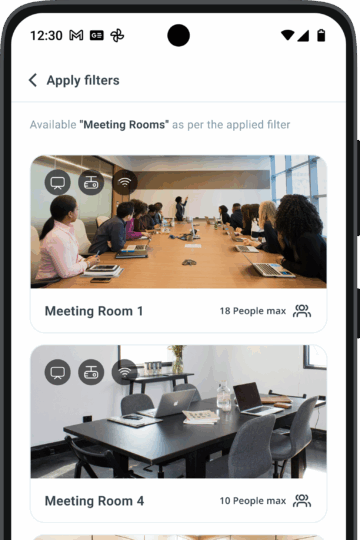
Key features of our enterprise meeting room booking software
1OfficeView is your go-to solution for seamless meeting room management. Designed with flexibility and efficiency in mind, our platform helps businesses optimize their office spaces and enhance productivity.
Meeting Room Check-Ins
Enter within the authorized meeting room through scanning a QR code from the mobile app that is already generated at the time of booking.
Facial Recognition
Enter the meeting room after a facial scan, assuring security and authenticity of the meeting.
Calendar Integration
Syncs easily with Google Calendar, Office 365, or other organizational calendars.
Confidential Meetings
Discuss the classified matters of your business by booking meeting rooms that are not visible to the other employees.
Comprehensive Dashboard Reports
View real-time insights on meeting room availability, who has booked, and which attendees have checked in. Customizable reports help optimize room utilization, improve scheduling efficiency, and streamline operations.
Meeting Room Display
MRM compiles all user requests, allowing the authority to view details such as the personnel requesting the room, the purpose, the required area, the time period for use, and other pertinent information.
Smart Refreshment Requests
Hosts and attendees can request refreshments directly through the mobile app after check-in. Requests are instantly sent to the Cafeteria Admin for swift service.
Proactive Housekeeping Alerts
Before a meeting ends, hosts receive a notification asking if housekeeping is needed. Upon confirmation, the request is automatically sent to the Housekeeping Admin.
Seamless Visitor Coordination
Visitors linked to meeting room bookings receive an automatic Visitor Pass in advance, ensuring a seamless entry experience.
How Meeting Room Booking works in 1OfficeView
1OfficeView is fully customizable, right out of the box.
You can add modules to suit business requirements and implement changes driven by user feedback. You get limitless business functionality and space optimization at your fingertips, thanks to the 1OfficeView Moible App.
Step 1 — Check availability instantly
View all meeting rooms across floors and locations on a live map. Filter by capacity, equipment, and time slot to find the right room in seconds.
Step 2 — Book in one tap
Reserve the room from the mobile app, web portal, or Microsoft Teams. Add attendees, set a recurring schedule, and request pantry service — all in one booking flow.
Step 3 — Check in & manage your meeting
Scan the QR code or use facial recognition at the room display panel to confirm your booking. Get housekeeping alerts before the meeting ends.
Why enterprises choose 1OfficeView
Why 200+ Indian enterprises use 1OfficeView for meeting room management
- Prevents Scheduling Clashes
With a well-coordinated and managed system, eliminate double bookings and prevent booking conflicts.
- Provides Real-Time Availability
Get instant access to current workspace and meeting room availability for smoother planning.
- Cuts Real Estate Expenses
Judiciously use office space and decrease expenses related to infrastructure and services management.
- Cent-Percent Usage
Make sure that every last of your workspace is utilized, avoiding any case of underutilized space.
- Value your Time
Simplify booking procedures to reduce the time employees spend finding available workspaces or meeting rooms.
Frequently asked questions about Meeting Room Booking Software
What is a meeting room booking system?
A meeting room booking system helps organizations easily schedule and manage conference rooms. With 1OfficeView, employees can view real-time room availability, book meeting rooms through a web or mobile platform, and avoid double bookings. This conference room booking software improves meeting planning and optimizes office meeting spaces.
Does 1OfficeView integrate with corporate calendars for meeting room booking?
Yes. The meeting room booking system in 1OfficeView integrates with corporate calendars to enable seamless meeting scheduling. With two-way calendar synchronization, meetings scheduled through the platform automatically reflect in employee calendars and vice versa. This calendar-integrated meeting room booking system helps avoid double bookings and ensures accurate conference room availability.
Can visitors be invited while booking a meeting room?
Yes. 1OfficeView integrates the meeting room booking system with the visitor management system, allowing employees to book meeting rooms and invite visitors from the same platform. Visitors can be pre-registered, and hosts receive notifications when their guests arrive, improving the overall visitor and meeting experience.
Can employees request services like pantry or housekeeping for meetings?
Yes. While booking a meeting room in 1OfficeView, employees can raise service requests such as pantry support or housekeeping for the meeting. This ensures meeting rooms are properly prepared with refreshments and cleaning services, making meetings more organized and efficient.