

Smart Cafeteria Management Software for Modern Offices
1OfficeView’s cafeteria management software digitises every step of your office dining experience — from live menu browsing and mobile meal booking to QR-based contactless pickup. Reduce food waste, eliminate lunch queues, and give employees and visitors a seamless cafeteria experience across all your office locations.
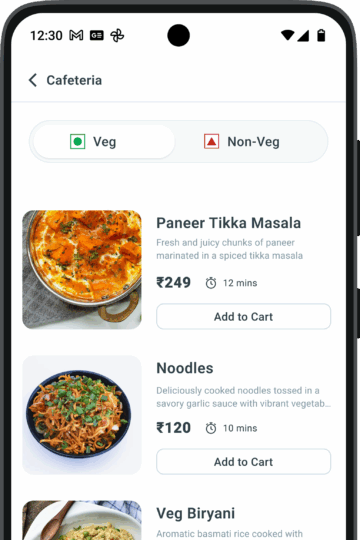
Key features of our Cafeteria Management Software
1OfficeView’s Cafeteria Management Software manages menus, orders, and consumption in real time—whether you’re a user, admin, or vendor. Our system ensures seamless booking, instant QR passes, and insightful reporting—all from a single platform.
Live Menu Display
Real-time display of meal options on mobile app or kiosks, updated by vendors via a secure link.
Flexible Meal Booking
Book meals through the mobile app or kiosk based on your schedule—quick and user-friendly.
Smart Order Acceptance
Orders are notified instantly to the cafeteria admin for timely preparation.
QR-Based Lunch Pass
Every booked meal generates a unique QR code, simplifying contactless pickup.
Meal Preparation Timers
Built-in timers for each item help notify users and manage cafeteria workflows.
Seamless QR Collection
Users scan their QR codes at the kiosk/tablet to collect their meals without delay.
Insightful Consumption Reports
Admins and vendors can view item-wise reports, user preferences, and vendor performance.
Kiosk Integration
Integrated touchpoints for browsing, booking, and managing meals, enhancing user interaction and reducing queues.
Modify/Cancel Orders:
Users can update or cancel meal bookings before the vendor’s cutoff time, ensuring zero food wastage and full flexibility.
How 1OfficeView Cafeteria Management Software works.
1OfficeView is fully customizable, right out of the box.
You can add modules to suit business requirements and implement changes driven by user feedback. You get limitless business functionality and space optimization at your fingertips, thanks to the 1OfficeView Moible App.
Step 1 — Browse the live menu
Employees open the 1OfficeView mobile app or kiosk and see the day’s live menu, updated in real time by vendors. Filter by meal type, dietary preference, or time slot.
Step 2 — Book your meal in seconds
Select items, confirm your time slot, and book. A unique QR code is instantly generated as your digital meal pass — no cash, no tokens, no queues.
Step 3 — Scan & collect
At the cafeteria, scan your QR code at the kiosk or tablet. Cafeteria staff get notified, your meal is prepared on time, and you collect without any wait.
Why enterprises choose 1OfficeView for Cafeteria Management Software.
1OfficeView is an integrated software solution that amalgamates Meeting Room, Workspace, Visitor, Cafeteria, Parking & Housekeeping Management.
- Zero food waste
pre-booking data lets vendors prepare exact quantities, eliminating over-production and wastage.
- No more lunch queues
QR-based pickup means employees collect meals in under 30 seconds.
- Vendor performance tracking
item-wise reports show which menus perform best and which vendors need improvement.
- Visitor meal integration
visitors registered via the visitor management system can order directly from kiosks.
- Multi-location support
manage cafeteria menus and orders across all your office campuses from one admin dashboard.
Frequently Asked Questions about Cafeteria Management Software
What is 1OfficeView Cafeteria Management Software?
1OfficeView cafeteria management software lets employees and visitors order meals via mobile app or kiosk. Vendors can upload menus with time slots and categories, and cafeteria staff can accept and complete orders. Users get real-time order notifications.
Can visitors and external users order meals?
Yes. 1OfficeView integrates with the visitor management system (VMS), allowing visitors to order meals directly from kiosks.
How do cafeteria staff manage orders?
Cafeteria staff can accept and complete orders via a tablet. Orders include item, date, time, and order number, and reports on orders and vendor performance can be viewed on the web portal.
How does 1OfficeView improve employee and visitor experience?
1OfficeView makes meal ordering fast and convenient. Users can pre-book meals, track order status, and visitors can order directly from kiosks.